
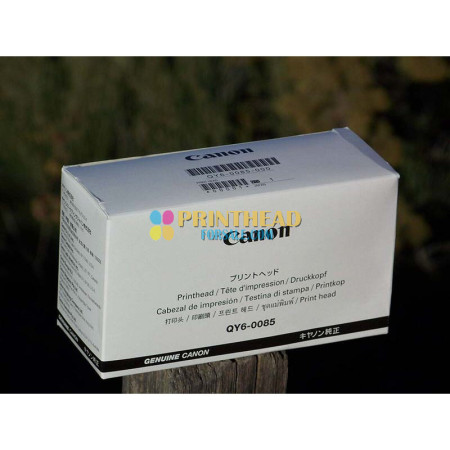

Genuine Canon QY6-0082-010 printhead for iP7220 MG5420 MG5520 MG5620 MG5720
MPN QY6-0082-010
Compatible Model QY6-0082-000
Country/Region of Manufacture Japan
Compatible Printers :
Canon Printhead for iP7210, iP7220, iP7240, iP7250, iP7280, MG5410, MG5420, MG5450, MG5460, MG5470, MG5520, MG5550, MG5620, MG5650, MG5720, MG5721, MG5722, MG5750, MG5751, MG5752, MG5753, MG6420, MG6450, MG6620, MG6650, MG6820, MG6821, MG6822, MG6850
Is this a genuine, new OEM Canon printhead? YES!! Some other sellers offer counterfeit heads from China. But I sell only new, unopened printheads manufactured by Canon in Japan.
Is this the same as a QY6-0082-000? What is the difference between QY6-0082-000 and QY6-0082-010? The QY6-0082-010 that I'm selling is a direct, perfect replacement for a QY6-0082-000. The only difference is that the QY6-0082-010 contains slight design improvements from Canon. (It's like saying "version 1.1".)
Does the printhead come with ink cartridges? No.
Can I reuse my old ink cartridges in the new printhead? Yes, if they still have ink in them.
What causes horizontal white lines in the print? Usually dried nozzles in the printhead.
What does a B200 error mean? This means the printhead has failed. Replacing the printhead will fix this error code.
My printer had a B200 error code. I replaced the printhead and the B200 error code went away. But now the printer prints only blank pages. What's wrong? Unfortunately this means that in addition to the B200 error, there is a secondary problem with your printer.
How can I fix blurry print? First try running a head alignment. If that doesn't work, clean the encoder strip. The encoder strip is a strip of clear plastic about 1/4" tall that runs left to right above the printhead carriage shaft. The clear plastic has a series of tiny, vertical black lines inside that allow the printer to keep track of the position of the head. Clean it, front and back, with a damp paper towel.
Can I revive my old printhead? Maybe! The most important thing to try is cleaning the parking station. Here's how:
Open the front (as if to change cartridges).
Unplug your printer.
Look inside to the right (or left).
Slide the printhead carriage to the other side so that you have access to the parking station.
Look for the parking station. It looks like two (or more) sponges the size of a postage stamp, surrounded by rubber seals.
Use some damp paper towels and/or Q-tips to clean that area (especially the rubber seals) as best as you can.
Let it air dry.
Plug it in.
Turn it on. The printhead will automatically move back to the proper location. (You don't need to manually slide it back.)
Try to print.
Are there any other tricks I can try to revive my printhead? Yes. If cleaning the parking station doesn't work, here are a few other things to try:
Run a few deep cleaning cycles.
Make sure your ink cartridges have enough ink in them.
If you're using 3rd party ink, try using genuine Canon ink. Sometimes the 3rd party ink tanks don't have the right internal air pressure, making it hard for the ink to come out.
Remove the printhead and clean the bottom with a damp paper towel. Be careful only to wipe front to back. Wiping side to side can cross-mix the colors.
Soak the printhead nozzles in Windex.
Using a hypodermic needle, inject a little Windex through the sponge into the bottoms of the ink tanks. Then run a cleaning cycle.
What is the purpose of the parking station, and why is cleaning it so important? The parking station is the place where the print head “rests” when it is not printing. Usually it’s on the right side of the printer (looking at the printer from the front). The parking station has rubber seals that are supposed to surround the printhead when it’s parked. These seals have two purposes: 1) to keep the printhead from drying out when it is not printing, and 2) to provide a tight seal for strong suction when the printer is self-cleaning the head. Some printers also have rubber wiper blades that move across the bottom of the printhead to remove accumulated ink. All these rubber pieces get “gunked” up over time with condensed ink. This prevents a tight seal, allowing the head to dry out and preventing suction during the cleaning cycle.

Returns Policy
You may return most new, unopened items within 30 days of delivery for a full refund. We'll also pay the return shipping costs if the return is a result of our error (you received an incorrect or defective item, etc.).
You should expect to receive your refund within four weeks of giving your package to the return shipper, however, in many cases you will receive a refund more quickly. This time period includes the transit time for us to receive your return from the shipper (5 to 10 business days), the time it takes us to process your return once we receive it (3 to 5 business days), and the time it takes your bank to process our refund request (5 to 10 business days).
If you need to return an item, simply login to your account, view the order using the 'Complete Orders' link under the My Account menu and click the Return Item(s) button. We'll notify you via e-mail of your refund once we've received and processed the returned item.
Shipping
We can ship to virtually any address in the world. Note that there are restrictions on some products, and some products cannot be shipped to international destinations.
When you place an order, we will estimate shipping and delivery dates for you based on the availability of your items and the shipping options you choose. Depending on the shipping provider you choose, shipping date estimates may appear on the shipping quotes page.
Please also note that the shipping rates for many items we sell are weight-based. The weight of any such item can be found on its detail page. To reflect the policies of the shipping companies we use, all weights will be rounded up to the next full pound.